The topic of AI-Powered Test Case Review with MagicPod MCP Server and Claude is currently the subject of lively debate — readers and analysts are keeping a close eye on developments.
This is taking place in a dynamic environment: companies’ decisions and competitors’ reactions can quickly change the picture.
The number of teams automating E2E tests with no-code tools like MagicPod is increasing. The hurdle for creating test cases has certainly lowered. However, who ensures the quality of the created test cases, and how?
For source code in product development, there is a place where code management and review are integrated, such as GitHub Pull Requests. On the other hand, no-code test automation tools often lack an equivalent environment, leaving the establishment of a review system to the team’s will and ingenuity. Often, the creator of a test case remains the only person who understands it deeply. It is worth pausing to consider whether this state is leading to individual dependency (siloing).
In this article, I will introduce a mechanism for AI review of test cases by combining the official MCP server provided by MagicPod with Claude. I have summarized it in a reproducible form, from setup to actual review.
To ensure that even those unfamiliar with terminal operations can reproduce this, I have also included GUI-based procedures.
The MagicPod MCP Server is an official module for operating various MagicPod functions from AI agents (Claude, Cursor, Cline, etc.). It is published on GitHub as MIT-licensed OSS, and no additional costs are incurred on the MagicPod side.
In the AI review described in this article, we use the “retrieval of test case information” among these. It only reads test cases and does not make changes to existing tests. Note that test creation, editing, and execution are only supported in cloud environments, and not in local PC environments—a constraint to keep in mind. All you need is a MagicPod contract and a Claude subscription.
Furthermore, the official help also introduces how to identify unstable locators using the MCP server. This content is also included in the review criteria of this article, showing that MagicPod also envisions improving test case quality via MCP.
important Note: The official help explicitly states that user information is not used for machine learning via the MCP server, and MagicPod does not retain the entered prompt information. The Web API token is written in the MCP server’s config file but is designed not to be passed to the AI agent.
In this article, I explain the procedure using Claude Desktop because it is an environment that is easy to introduce even for those not used to CLI or terminals. Terminal operation is limited to just one edit of a configuration file; everything else is completed within the chat UI. It can be set up via GUI, and the MCP connection status can be checked on the screen, making it suitable as a first step for those encountering MCP servers for the first time.
Since the MagicPod MCP server complies with MCP (Model Context Protocol), it can be used from any AI tool that supports MCP. The review criteria and prompts in this article are designed to be general-purpose and tool-independent.
Cursor has a mechanism called Project Rules, and you can place the Skill file from this article directly as a Rule. An article by Hacobu (“Trying to create an AI review mechanism with Cursor × MagicPod MCP Server”) is a helpful preceding case for Cursor users. Refer to Cursor’s official documentation for how to set up the MCP server.
Claude Code also supports MCP servers. You can achieve equivalent operation by writing the contents of the Skill file in CLAUDE.md or specifying the MCP server with the –mcp-config option. This might be easier for those comfortable with the terminal.
Since September 2025, ChatGPT has supported MCP servers in Developer Mode. However, it only supports remote servers (SSE / streaming HTTP) and does not support local execution (stdio). Since the MagicPod MCP server is a stdio method launched via npx locally, you need to use something like ngrok to create a tunnel to connect directly from ChatGPT. In terms of ease, Claude Desktop or Cursor are simpler to set up.
If you add the MagicPod MCP server to the MCP server configuration file (equivalent to claude_desktop_config.json), it will work with any tool. The review criteria prompts are plain text, so there is no need to convert them to tool-specific formats.
Note: Although the steps in this article assume Claude Desktop, the design of the review criteria and the content of the Skill file are the essence of this mechanism. Choose the tool based on your preference.
The following steps are for the first time only. Once the setup is complete, the AI will autonomously execute reviews according to the data the Skill file.
Access https://app.magicpod.com/accounts/api-token/, issue a token, and copy it.
npx is required to run the MCP server. Please install the LTS version from https://nodejs.org/.
Replace PASTE_YOUR_TOKEN_FROM_STEP_1_HERE with the API token string you copied in Step 1. The token should directly follow –api-token= (e.g., –api-token=abc123def456).
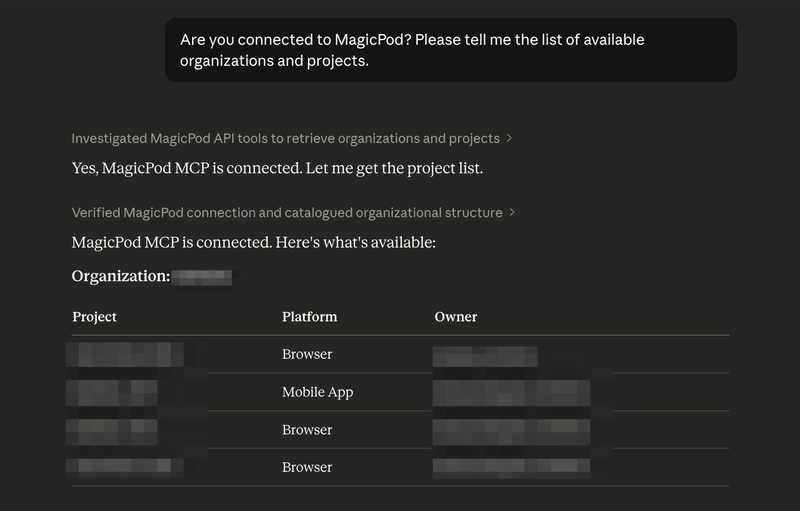
Note: To check the MCP after restarting, look under the + → Connectors below the chat input field. It’s okay if magicpod-mcp-server is displayed. If it doesn’t appear in an already open chat, try opening a new chat.
A Skill file is a Markdown file that teaches an AI agent how to perform a specific task. Based on the Agent Skills Open Standard, the same SKILL.md format can be used across multiple tools like Claude Code, Cursor, Gemini CLI, and Codex CLI.
The Skill file provided in this article combines the following into a single file:
If you have multiple projects, rewrite the “Basic Settings” section of the Skill file as follows:
The core of a Skill file is the definition of review perspectives. Here, based on the 10 perspectives from the MagicPod official blog post, 10 Ideas for Test Automation Review Perspectives, we have categorized them into those that are easy for AI to detect and those that require human judgment.
This classification is a crucial point that determines the accuracy of the Skill file. While an AI will function even if you simply ask it to check everything, the results will be a mix of irrelevant comments and useful suggestions, making it time-consuming to filter through them. By deciding in advance what to leave to the AI and what should be reviewed by a human, the reliability of the output increases, bringing the quality closer to a level where review results can be shared with the team as they are.
Note: MagicPod Web API’s human_readable_steps does not include step line numbers and cannot distinguish whether a step is disabled. Identifying the specific location of a finding must be based on step content.
To conclude, they function well for a primary screening in AI reviews, but they are not a silver bullet. Based on the results of reviewing over 60 test cases across multiple projects, here are the strengths and limitations of these 10 perspectives.
Among the 10 perspectives, issues such as missing assertions (Perspective 1), naming deficiencies (Perspective 4), overly long tests (Perspective 7), and underutilized shared steps (Perspective 8) can be identified by looking at the structure of the test case. AI excels at this type of pattern matching and was able to detect these with high accuracy during actual reviews. In particular, empty description fields were found in many test cases, and it can be said that this single perspective alone made the review worthwhile.
On the other hand, as mentioned in the official blog as other perspectives, consistency with test design documents and the validity of test data are not included in these 10 perspectives. These are difficult to judge within a MagicPod review alone, as they require cross-referencing with test design documents or product specifications. Therefore, this is currently a heavy burden for AI reviews via MCP.
In this review, points were raised that were not included in the original 10 perspectives. These were all observations regarding test cases created to verify MagicPod’s behavior, but it is noteworthy that the AI picked up on such remnants.
These are examples where the AI picked up additional issues from the context without being bound by the list of perspectives in the prompt. In other words, while specifying the 10 perspectives in the prompt, there is room for the AI to expand upon them autonomously. I feel that it is important for the practical operation of AI reviews to not restrict the perspectives too strictly and to leave some margin for the AI.
In summary, the 10 perspectives are well-balanced for covering test case implementation quality and can be recommended as a baseline for AI reviews. Reviews that require test design validity or product-specific domain knowledge remain the role of humans.
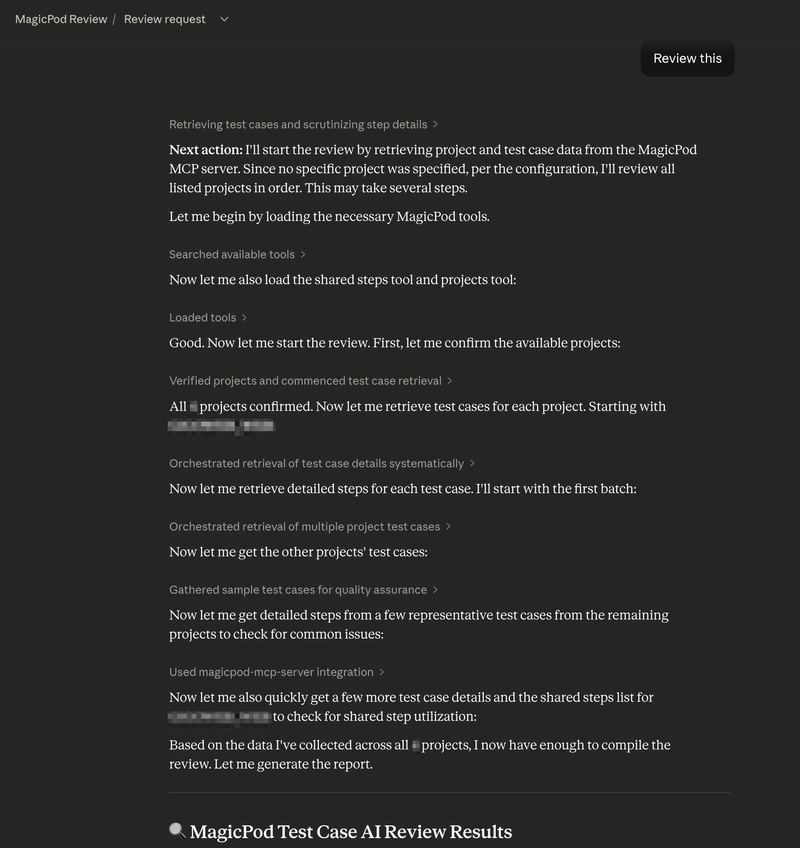
Since the organization name, project name, viewpoints, and output format are all defined in the Skill file, the AI will autonomously perform the following steps with just that one phrase: “Retrieve test case list -> Analyze each step -> Check according to the data viewpoints -> Output according to the data the format.”
Note: Please execute this from the chat within the project where the Skill file is located. If you type “Review this” in a regular chat (outside of the project), the AI will ask “What would you like me to review?” because the Skill file will not be loaded.
Once the review results are available, you can also generate reports for sharing.
The Skill file includes templates for both Slack mrkdwn and standard Markdown formats, ensuring the output matches your intended destination.
In environments where the Slack MCP connector is connected, entering “Summarize for Slack” will present you with options such as:
If the Confluence or Jira MCP connectors are connected, you can also create Confluence pages or Jira tickets directly from the chat. Even in environments without active MCP connectors, text output for copying and pasting is always available.
The following is an example of a report output for Slack (project names and other details have been replaced with placeholders).
The report features a three-tier structure: Priority Improvement Actions, followed by Project Summaries, and then Details in Threads. This format allows the team to understand exactly what to do first at a glance. By also including positive points (💡), I have ensured the report provides encouragement rather than just pointing out issues.
The Skill file defines rules to handle these types of instructions, so it works simply by adding conditions in natural language.
We executed AI reviews on more than 60 test cases across 4 projects. The following are the results.
A large number of the target test cases had empty description fields. This is likely a common situation across many teams. When only the test case name is provided, the intent is not conveyed effectively, which leads to lower accuracy in reviews, handovers, and AI utilization.
While MagicPod features an AI summarization function, it summarizes the actions of the steps. The underlying purpose, such as what specifically needs to be verified in the test, must be written by a human.
Test cases created at the beginning of projects to verify MagicPod’s behavior were still present. Although they were stored in an old folder separate from production regression tests, the AI review accurately detected issues with them.
All of these were remnants from when MagicPod’s behavior was being tested. In the production regression tests, naming conventions were unified and assertions were properly implemented. However, the AI’s ability to point out that these traces of experimentation remaining in the project could become noise during bulk execution was very useful.
These are the types of issues that anyone would notice if they performed a review, but if no review is conducted, they remain neglected forever. The value of an AI review lies in mechanically picking up these problems that are obvious upon inspection but lack someone to look at them.
Furthermore, some findings emerged that were not included in the ten initial perspectives.
While following the list of perspectives, the AI sometimes picks up additional issues from the context. This behavior is similar to that of a human reviewer and can be seen as an advantage of not strictly limiting the prompts.
AI reviews were also effective for detecting good practices, not just pointing out flaws.
Reports that only contain criticisms can lower team motivation. Including notes on what is well-done increases the overall acceptability of the report.
AI review is not a silver bullet. It is necessary to recognize the following limitations in advance.
In practice, a realistic approach is a two-tier structure: use AI review for self-review or primary screening, and then have a human review only the points that require human judgment. A workflow is becoming widespread where an AI review runs first on a code Pull Request, and humans focus on making decisions after reviewing the summary. The same structure can be applied to test case reviews.
The reason test case reviews become dependent on specific individuals often stems from the lack of a formal review system. When review criteria are vague and reviewers lack sufficient time, the reviews themselves eventually stop happening.
The MagicPod MCP server combined with AI offers a solution to this problem, providing consistent primary screening rather than a perfect review. In this experiment, the fact that many test case description fields were empty is something a human reviewer could also point out. What the AI did was simply look at them.
If you are already using MagicPod, setup takes only five minutes, and it takes about ten minutes even including the placement of the Skill file. The only additional cost is the fee for Claude. Why not start by typing review into one of your projects and seeing what kind of feedback you get?
The review perspectives, output formats, and report sharing features explained in this article are all included in this single file. Please replace {Organization Name} and {Project Name} with your own environment and add the file to the location mentioned earlier.
Are you sure you want to hide this comment? It will become hidden in your post, but will still be visible via the comment’s permalink.
For further actions, you may consider blocking this person and/or reporting abuse
Would you like to become an AWS Community Builder? Learn more about the program and apply to join when applications are open next.
DEV Community — A space to discuss and keep up software development and manage your software career
Built on Forem — the open source software that powers DEV and other inclusive communities.
Why it matters
News like this often changes audience expectations and competitors’ plans.
When one player makes a move, others usually react — it is worth reading the event in context.
What to look out for next
The full picture will become clear in time, but the headline already shows the dynamics of the industry.
Further statements and user reactions will add to the story.