It’s not hard to find midsized, portable Bluetooth speakers that will crank out your tunes and power your party. Some deliver strong battery life, and many have extra features like auxiliary inputs and app-based EQ settings. But let’s face it, when the words “portable” and “speaker” show up together, the result is often a plasticky product that might look fine in a dorm room, but doesn’t exactly class up a joint.
Vibe has always been Marshall’s superpower. The company that created rock and roll’s most iconic guitar amplifiers has a knack for producing speakers that exude a retro-classic cool. I’d argue that the brand’s aesthetics alone are enough reason to consider buying one of its latest speakers, the Kilburn III, but thankfully, Marshall has given its third-gen Kilburn a generous helping of upgrades. When you look at the sum of the parts, the Kilburn III is in a class by itself.
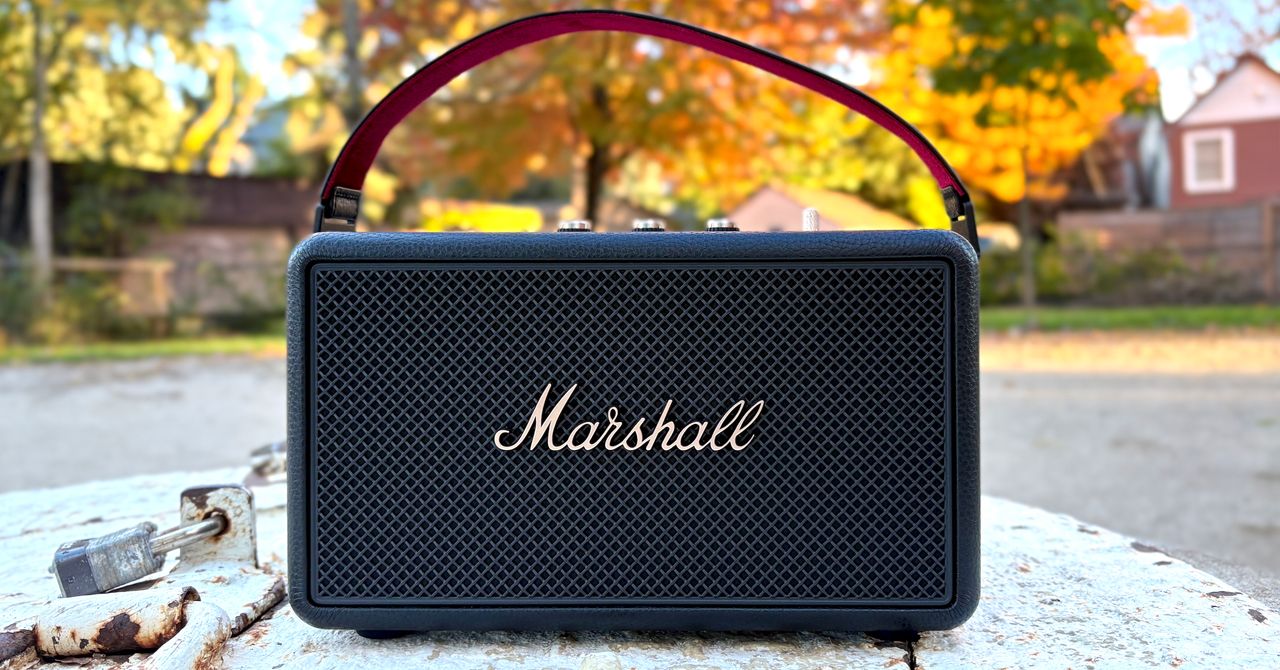
I don’t need to describe in-depth what you can see in these photos with your own eyes. The Kilburn III, which comes in a black-brass combo seen here, and a cream-colored skin, is pure Marshall. You get the classic, amp-inspired faux leather cabinet, the oversized control knobs, and the Marshall script logo. It comes with a removable, red velour-lined carry strap and a 6.5-foot USB-C charging cable (but no wall dongle).
I kinda love that the company is leaning harder into its amplifier heritage: The Kilburn III’s power switch is a delightfully tactile, spring-loaded, knurled metal lever that looks as if it were lifted from an amp. It offers zero advantages over the previous design, which combined power and volume in a single knob, but it’s fun to use and looks badass.
Another welcome addition is a playback control. It’s hard to believe, but the previous Kilburn II doesn’t have one. On the new speaker, it’s a rocker switch that moves side to side for track skipping. To play-pause, you press downward. Like the power lever, it’s got great tactility. There’s no need for backlighting—it can be used with your eyes closed.
The Kilburn III is also better able to handle the elements. Don’t go tossing it in a pool, but rain and sand shouldn’t be a problem now that it’s IP54 rated (versus IPX2 on the second-gen).
Marshall fans take note: There are a lot of other differences between this model and the second-gen Kilburn. At 10.7 x 5.9 x 6.6 inches, the new model is now an inch bigger on each dimension and about half a pound heavier at 6.17 pounds. That’s the same weight as the Sonos Move 2, and yet the Kilburn feels far lighter and easier to carry because of its strap, which is more comfortable and secure than the Move 2’s integrated rear handhold.
The Kilburn III continues to use Marshall’s “True Stereophonic” acoustics with a dedicated woofer, but now features dual full-range drivers instead of the second-gen’s tweeters.
Power has increased from 36 watts to 50 watts, and yet, Marshall says it can extract over 50 hours of playtime from the internal rechargeable battery—more than double the Kilburn II’s 20 hours.
What’s wild about this jump in stamina is that it’s disproportionate to the battery’s capacity. The Kilburn II ships with a 5,200 mAh cell, while the new model is only about 5 percent bigger: 5,500 mAh. Clearly, some big efficiencies have been gained. In fact, Marshall is so confident about the Kilburn III’s power reserves that it now lets you charge your devices from the speaker’s USB-C port.
A word of caution: The direction of the charge is dependent on the Kilburn’s status. When the speaker is powered on, charging flows outward to phones and other accessories. However, when the power is off, the speaker will draw power from them. The Kilburn won’t automatically power off when a USB device is connected, but if you turn it off manually (or connect a device while it’s off), your phone will drain instead of charging.
To help extend the battery’s lifespan, you can enable up to three preservation schemes in the Marshall app: setting the maximum charge to 90 percent, adjusting the charging speed in hot and cold conditions, and capping charging speed whenever connected to power. When the battery eventually dies, an access door on the bottom of the cabinet makes it easier to replace. Previously, you’d need to disassemble the entire speaker.
Unfortunately, Marshall doesn’t include a 30-watt USB-C PD power adapter, which you’ll need to quick-charge the Kilburn (20 minutes gives about extra eight hours of playtime) or to fully recharge the speaker (about three hours). Maybe that’s because Marshall doesn’t want you to use such a powerful charger as your main power source, and actually warns against it in the app.
And yet, less powerful chargers will slow the process considerably; a typical 5-watt charger could take up to 22 hours for a full recharge. A 10-bar LED battery gauge on the top panel does make it easy to keep tabs on how things are going, so you can see when it’s really slow.
This speaker sounds great for its size and its price. It’s not going to rock your house party single-handedly (it gets decently loud but not wake-the-neighborhood loud), but it has a degree of bass resonance that I normally associate with larger units, and decent balance through the frequency range. Distortion is very well controlled; even with volume maxed out, Billie Eilish’s bass-tastic “bad guy” only hinted at being too much for the system. I noted a small loss of detail in the upper-mids, combined with a slightly harsh presentation of highs. It was most noticeable with strong female vocalist tracks like Adele’s “Skyfall.”
Thankfully, there are plenty of tweaks available to generate a mix that suits your tastes. Within the silver-icon Marshall Bluetooth app (not to be confused with the gold-iconed Marshall Wi-Fi app), you’ll find five EQ presets (the default Marshall tuning plus four more), plus the ability to create one of your own using the five-band equalizer. The “M” button on the Kilburn III’s top panel lets you swap between the Marshall tuning and one other preset of your choosing.If these aren’t enough, you can crank the speaker’s dedicated bass and treble knobs for even more range (or just use them on their own).
Marshall’s driver arrangement, which puts a full-range transducer on the front and back, makes it more versatile in terms of placement than traditional front-firing speakers. Marshall’s claim of full, 360-degree sound is accurate: put the Kilburn III in the middle of your space and there isn’t a bad seat in the house. On the other hand, putting it in a corner or near a wall will affect the sound, so there are a few placement adjustments in the app that can help the speaker compensate, to a degree.
The brand’s claim of “stereophonic” audio should be taken with a grain of salt. The Kilburn III does indeed reproduce both left and right channels—thus, technically, it’s stereo—but you’re not going to experience true stereo separation. Instead, you can think of it as a single point source of sound that has a very expansive footprint.
That expansiveness can come at the cost of precision. Though the Kilburn III is better than the Move 2 at filling a room evenly, Sonos’ speaker delivers greater detail—especially when you sit in its sweet spot. The other downside is that Marshall hasn’t developed a way to adapt its stereophonic speakers, like the Kilburn III, to work as stereo pairs, a nearly ubiquitous feature on similar speakers at this price. In fact, there’s also no built-in way to create a multi-speaker system, as Marshall opted to discontinue its Stack Mode.
What you do get, as a kind of work-around, is Bluetooth Auracast support. Auracast is amazing technology: It lets you broadcast audio publicly or privately using Bluetooth, and receive devices like headphones or speakers that can see and connect to these broadcasts as easily as if they were Wi-Fi access points. Auracast can be used as an alternative to multi-speaker connection systems, but you’ll need a device to act as an Auracast source, and most phones and other audio sources can’t do that yet. Still, the Kilburn III is ready for it, and soon, so will Marshall’s Heston 60 and Heston 120 soundbars. When that happens, you’ll be able to use a pair of Kilburn III as Bluetooth surround speakers in a home theater system, which is pretty slick.
The Kilburn III doesn’t dazzle on the Bluetooth codec front. You get SBC, AAC, and LC3—all perfectly good, lossy options—but nothing high-quality like LDAC or aptX Adaptive. I think Marshall missed an opportunity by not adding USB Audio to the Kilburn’s USB-C port for hi-res audio up to 24-bit/96kHz. Still, the Aux-in port is a good alternative. You could connect to a portable DAC and enjoy almost lossless audio (the speaker still digitizes the input before finally rendering it back to analog).
Marshall’s iconic design and the Kilburn III’s sound quality are a potent combo that few portable speakers can match. The latest version is a little pricier than its predecessor, but thanks to its massive battery life, better onboard controls, app-based EQ settings, and better protection from the elements, the Kilburn III is a better value than many similarly priced speakers.