The topic of Mobile Test Automation Frameworks in 2026: How to Choose is currently the subject of lively debate — readers and analysts are keeping a close eye on developments.
This is taking place in a dynamic environment: companies’ decisions and competitors’ reactions can quickly change the picture.
There are more mobile testing frameworks available in 2026 than ever before and picking the wrong one costs you months. Not in licensing fees, but in setup time, maintenance overhead, and the engineering hours spent fighting flaky tests instead of shipping features.
The problem with most “best frameworks” articles is that they rank tools by popularity instead of fit. Appium is great until your team spends 60% of QA time fixing broken selectors. Espresso is fast until you need iOS coverage. Maestro is simple until you need to test dynamic UIs that change with every A/B experiment.
This guide takes a different approach. We’ll walk through the 7 frameworks that matter in 2026, give each one an honest assessment of where it excels and where it struggles, and then help you decide when Drizz a Vision AI testing platform is the right choice for your team.
1.What are you testing? Native apps, hybrid apps, mobile web, or progressive web apps? Some frameworks only support one type.
2.Which platforms? Android only, iOS only, or both? If both, you need to decide: one cross-platform framework, or two native ones with separate test suites?
3.What’s your maintenance tolerance? A framework that’s easy to set up but creates a 200-test maintenance burden six months later isn’t actually saving time. The total cost of ownership matters more than the getting-started experience.
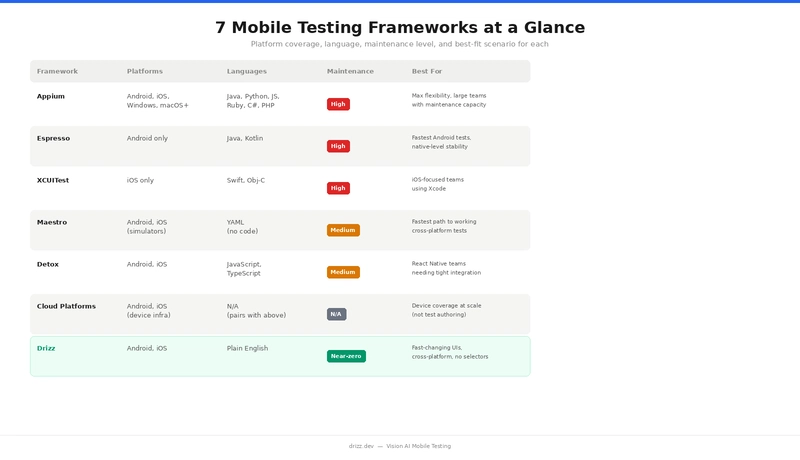
What it is: The open-source industry standard for cross-platform mobile test automation, built on the W3C WebDriver protocol.
Platforms: Android, iOS, Windows, macOS, Tizen, and more. Languages: Java, Python, JavaScript, Ruby, C#, PHP.
Best for: Large teams with strong engineering capacity that need maximum platform flexibility and can absorb the maintenance overhead.
What it is: Google’s official UI testing framework for Android, built into Android Studio.
Platforms: Android only.
Languages: Java, Kotlin.
App types: Native Android.
Cost: Free.
Best for: Android-focused teams who want the fastest, most stable test execution and are willing to maintain a separate iOS solution.
What it is: Apple’s native UI testing framework, built into Xcode.
Platforms: iOS only.
Languages: Swift, Objective-C.
App types: Native iOS.
Cost: Free (requires macOS and Xcode).
Best for: iOS focused teams who build in Xcode and want native level reliability without additional tooling.
What it is: A YAML-based UI testing framework for Android and iOS, designed for simplicity.
Platforms: Android (emulators and real devices), iOS (simulators).
Languages: YAML (no code required).
App types: Native, hybrid, web. Supports React Native, Flutter, Swift, Kotlin.
**Cost: **Free (MIT). Paid cloud execution via Maestro Cloud.
Best for: Teams that want the fastest path from zero to working cross-platform tests, especially for straightforward user flows.
What it is: A gray-box end-to-end testing framework built specifically for React Native.
Platforms: Android, iOS.
Languages: JavaScript/TypeScript.
App types: React Native (primary), with some support for native apps.
Cost: Free (MIT).
Best for: React Native teams who want the most reliable end-to-end testing with minimal flakiness.
What they are: Cloud-based real device labs that provide infrastructure for running your tests across thousands of device/OS combinations.
important distinction: These are not test authoring frameworks. They don’t help you write tests, they provide the devices to run them on. You still need a framework (Appium, Espresso, XCUITest, Maestro) to author and execute your tests.
Best for: Any team that needs broad device coverage without the operational burden of managing physical devices.
Every framework above from Appium to Maestro shares one architectural assumption: to interact with a UI element, you need to identify it through the app’s internal structure. Whether that’s an XPath, an accessibility ID, a resource ID, or a YAML reference, the test is ultimately pointing at something in an element tree. Drizz represents a fundamentally different approach that’s emerging as the next evolution in mobile test automation.
What it is: A Vision AI mobile testing platform that sees your app the way a human tester does through the rendered screen, not the element tree.
Platforms: Android, iOS.
Languages: Plain English test definitions.
App types: Native, hybrid.
Cost: Contact for pricing.
Best for: Teams where the UI changes faster than the test suite can keep up with frequent releases, A/B testing, dynamic content and where the maintenance cost of selector-based testing has become the bottleneck, not the solution.
Rather than ranking frameworks, here’s a practical decision guide based on your situation:
Most framework comparisons focus on setup and features. But the real cost of a mobile testing framework shows up six months after adoption when you have 200 tests, your app has shipped 20 UI updates, and someone has to keep everything passing.
If your team currently spends more time fixing tests than writing them, the framework isn’t the problem the locator paradigm is. That’s the specific problem Drizz was built to solve.
Which mobile testing framework is best for beginners?
Maestro and Drizz have the lowest learning curves. Maestro uses YAML and requires no coding. Drizz uses plain English test steps and eliminates the need to learn locator strategies entirely. Appium and Espresso require programming experience and take weeks to become productive with.
Can I use multiple frameworks together?
Yes. Many teams use Espresso or XCUITest for fast unit-level UI tests in their development workflow, then use a cross-platform tool (Appium, Maestro, or Drizz) for end-to-end regression testing. Cloud platforms like BrowserStack layer on top of any framework for device coverage.
Is Appium still worth learning in 2026?
Yes. Appium remains the most widely used mobile testing framework and understanding it is valuable for any QA career. However, for new test suites, especially on fast-moving apps, teams are increasingly choosing alternatives that reduce the maintenance burden Appium creates at scale.
How does Drizz handle apps with no visible text?
Drizz’s Vision AI identifies elements using visual context beyond just text, including icons, layout position, colour, shape, and surrounding elements. For apps that are heavily icon-based, you can describe elements by their visual appearance and position (e.g., “tap the search icon in the top right”).
Can Drizz integrate with CI/CD pipelines?
Yes. Drizz integrates with GitHub Actions, Jenkins, Bitrise, CircleCI, and other CI/CD tools. Tests can run automatically on every build, PR, or scheduled interval just like any other testing framework.
What’s the difference between Drizz and Maestro?
Both simplify test authoring compared to Appium. Maestro uses YAML and interacts through the accessibility layer, simpler than Appium but still element-based. Drizz uses Vision AI to identify elements visually, eliminating locator dependency entirely. The practical difference shows up in maintenance: Maestro tests can still break when accessibility identifiers change; Drizz tests adapt to visual changes automatically.
This is one of the rare posts that actually addresses the real bottleneck in mobile automation — not writing tests, but keeping them alive over time.
Most comparisons stop at features or speed, but your focus on maintenance cost as a first-class metric is spot on. In reality, a framework isn’t “good” if it saves time in week 1 but drains 60% of QA bandwidth by month 3. That trade-off was explained really well here.
The breakdown also makes a subtle but important point:
we’re no longer choosing just between tools, we’re choosing between testing philosophies —
→ selector-based (Appium, Espresso, XCUITest, Maestro)
→ state-aware (Detox)
→ vision-based (Drizz)
That shift is bigger than it looks. It changes who can write tests, how brittle they are, and how fast teams can ship.
What stood out most to me was the alignment with modern product teams — frequent releases, A/B testing, dynamic UI. Traditional locator strategies weren’t designed for that pace, and you’ve clearly articulated why they start breaking down at scale.
One question I’d love your take on:
As Vision AI matures, do you see it replacing selector-based frameworks entirely, or co-existing with them for deeper system-level validation?
Overall, this feels less like a “tool comparison” and more like a shift in how we should think about test automation in 2026. Definitely one of the more thoughtful reads on this topic.
This blog really helped me understand that choosing a mobile test automation framework isn’t just about using the most popular tool, but about aligning it with project needs, scalability, and team familiarity. I especially found the comparison between traditional tools and newer frameworks insightful, as it shows how quickly the ecosystem is evolving. As someone exploring this field, this gave me a much clearer direction on what to learn next
Really appreciated how this post connects Appium’s architecture directly to its biggest real-world issue — locator fragility. As someone just moving deeper into Java (and starting to think more seriously about backend + testing ecosystems), this gave me a much clearer picture of why tools like Appium feel powerful initially but become costly at scale.
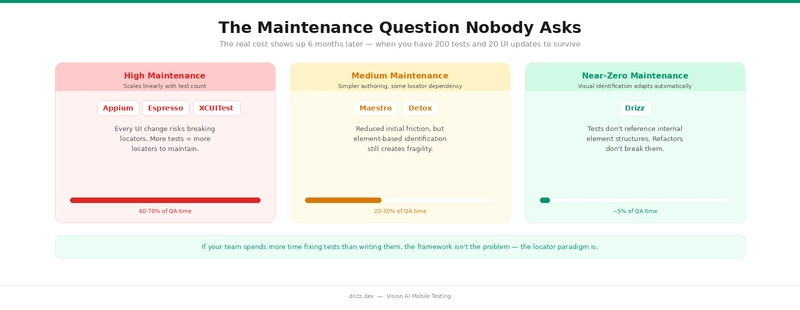
I’ve recently worked a bit with Flutter on the UI side, and even small widget changes can shift structure significantly — so I can already imagine how brittle XPath or locator-based tests can get in a fast-iterating app. That 60–70% maintenance overhead you mentioned doesn’t feel exaggerated at all in that context.
At the same time, I think the point about Appium still being relevant for deep device-level control is important. From a learning perspective, it feels like understanding Appium (and WebDriver concepts) is still a strong foundation before jumping into Vision AI tools.
Curious about one thing: for someone at my stage, would you recommend first building a small Appium-based framework (to understand the internals), or directly experimenting with newer approaches like Vision AI to stay aligned with where the industry is heading?
“The point about ‘Total Cost of Ownership’ vs. the ‘Getting Started’ experience is spot on. I’ve seen so many teams pick Appium or Espresso because they are the industry standards, only to realize six months later that they’ve essentially hired a full-time team just to fix broken selectors. In 2026, ‘it works’ isn’t enough anymore—it has to be maintainable at scale. Great breakdown of the maintenance tiers here.”
“Really interesting to see the shift toward Vision AI platforms like Drizz. We’ve spent years fighting the ‘locator paradigm,’ and it feels like we’re finally reaching a tipping point where the tool should be smart enough to understand the UI like a human does. The comparison between native speed and cross-platform maintenance is a classic dilemma—glad to see a guide that actually addresses the ‘6-month-later’ reality.”
Finally, a framework guide that prioritizes ‘fit’ over just ranking by GitHub stars! The breakdown of maintenance levels is a wake-up call for any team shipping weekly updates. That 60-70% QA time spent on fixes is a feature-killer. Thanks for the honest assessment of the 2026 landscape.
Well-structured overview of the 2026 mobile testing ecosystem. The distinction between frameworks, device clouds, and AI-native platforms is particularly useful for making informed decisions.
I appreciate the focus on maintainability and flaky test reduction often more critical than initial setup or tool popularity. Choosing based on team workflow and CI/CD integration rather than trends is a key takeaway.
Curious how you see AI-native testing evolving complementing or eventually replacing traditional frameworks like Appium?
This is one of the few articles that actually talks about the real cost of mobile test automation—maintenance, not setup.
The point about teams spending 60–70% of QA time fixing broken selectors with frameworks like Appium really hits. Most comparisons ignore what happens after 200+ test cases and frequent UI changes.
I also like the way the decision framework is structured, not “which tool is best,” but “which tool fits your context.” That’s how it should be approached in real engineering teams.
The shift from locator-based testing to Vision AI (like Drizz) feels similar to how frontend moved from manual DOM handling to abstraction layers. It reduces friction, but I’m curious how it performs in edge cases like heavily animated UIs or low-contrast elements.
One takeaway for me:
Choosing a framework is less about features and more about how much pain your team can afford later.
Solid breakdown 👏
Till now, I used to believe choosing a framework was mainly about popularity—like going with Appium or Espresso. But the focus on long-term maintenance really stood out to me. Spending 60–70% of QA time fixing broken selectors sounds frustrating, and honestly very realistic.
I also found the shift toward Vision AI interesting. Moving away from locator-based testing to something that understands the UI visually feels like a big step, especially for apps that change frequently or run A/B tests.
One thing I’m curious about — do you think tools like Drizz can completely replace traditional frameworks in future, or will they mostly coexist for cases where deeper system-level control is needed?
Overall, this felt more like a practical decision guide rather than just another “top frameworks” list.
This is a refreshing take. Too many comparisons stop at “what’s popular” instead of “what actually works under real-world constraints.” The point about hidden costs—like flaky tests and maintenance overhead—really hits, because that’s where teams quietly lose months.
I also like that you’re not overselling any one framework and instead showing the trade-offs. The brief callouts (Appium vs Espresso vs Maestro) already make it clear that “best” depends heavily on context, especially around platform coverage and UI stability.
Curious to see how Drizz fits into those gaps—especially whether it actually reduces flakiness in dynamic UIs or just shifts the complexity elsewhere. If it can genuinely cut down maintenance without sacrificing reliability, that’s a strong value prop.
This was a really good read. I used to think choosing a framework was mostly about what’s popular, but the way you explained the maintenance overhead part actually changed my perspective a bit. The point about teams spending more time fixing tests than writing them feels very real, especially with tools like Appium where selectors can break often. I did have one doubt though — these newer tools that focus on low maintenance and “self-healing” tests, how reliable are they in real-world projects.Do they actually reduce flakiness over time, or do they sometimes just hide issues and make debugging harder. Also, for someone who’s just starting out with mobile automation, would you still recommend beginning with Appium to understand the basics, or is it better to directly explore these newer frameworks?
Overall, learned something new from this,
thanks for sharing 👍
Really appreciate that this guide leads with the “total cost of ownership” framing rather than just a feature checklist. That’s the conversation most teams never have until they’re already burned.
The 60–70% QA time spent on selector maintenance with Appium is a real number — I’ve seen it firsthand. What’s frustrating is that it creeps up on you. Week one feels smooth, then three months in you realize half your sprint is triaging broken tests after a routine UI refactor. By then, switching frameworks feels expensive too.
The maintenance tier breakdown (high → medium → near-zero) was the most useful part of this for me. It reframes the decision from “which tool is easiest to start with” to “which tool am I comfortable living with at 200+ tests.” Those are very different questions.
One thing I’d add to the Detox section: even within React Native, teams sometimes hit edge cases with native modules or third-party SDKs that fall outside the RN bridge, and that’s where Detox starts struggling. Worth scoping your app’s native footprint before committing.
Curious how Vision AI handles scenarios where the same screen looks significantly different across device sizes or OS versions — does Drizz account for that kind of visual variance in its identification model, or does it require separate baselines per form factor?
Are you sure you want to hide this comment? It will become hidden in your post, but will still be visible via the comment’s permalink.
For further actions, you may consider blocking this person and/or reporting abuse
DEV Community — A space to discuss and keep up software development and manage your software career
Built on Forem — the open source software that powers DEV and other inclusive communities.
Why it matters
News like this often changes audience expectations and competitors’ plans.
When one player makes a move, others usually react — it is worth reading the event in context.
What to look out for next
The full picture will become clear in time, but the headline already shows the dynamics of the industry.
Further statements and user reactions will add to the story.