The topic of Right-Sizing vs. Auto-Scaling: Which Saves More on EKS? is currently the subject of lively debate — readers and analysts are keeping a close eye on developments.
This is taking place in a dynamic environment: companies’ decisions and competitors’ reactions can quickly change the picture.
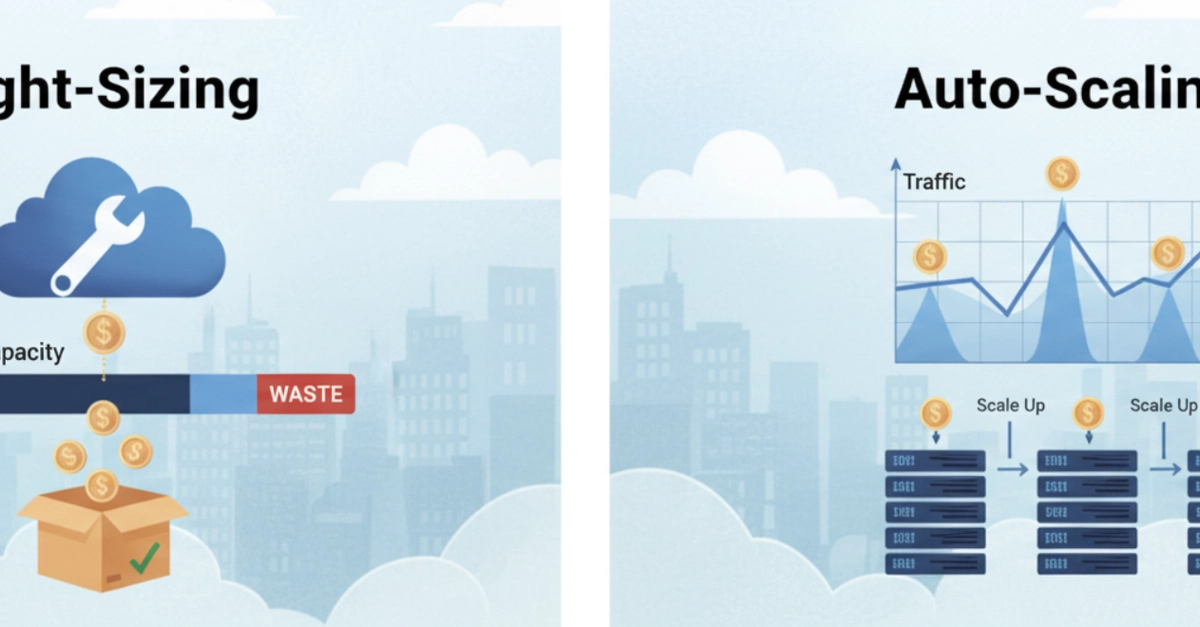
Most EKS cost conversations end up in the same place: someone enables Cluster Autoscaler, watches the node count drop slightly, and calls it done. Then the bill barely moves. The reason is that Cluster Autoscaler and right-sizing solve different problems, and applying one without the other leaves most of the savings on the table.
This piece breaks down what each approach actually does, where each wins, and in what order to apply them.
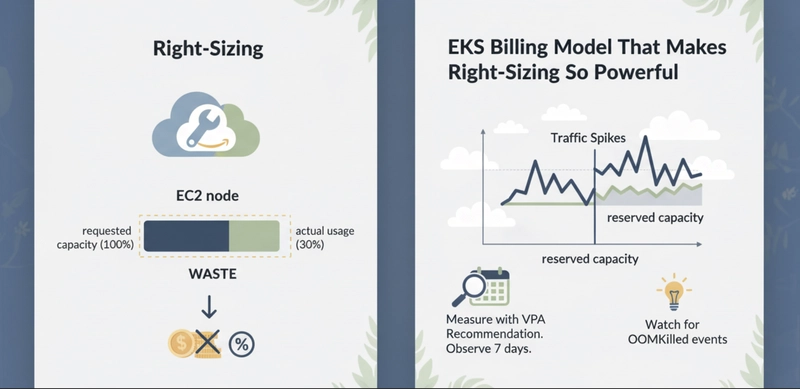
EKS bills for EC2 node capacity, not for what your pods consume. A node is running, so you pay for it, regardless of whether pods use 10% or 90% of its resources.
The waste happens at the request level. Kubernetes uses resource requests, not actual usage, to schedule pods onto nodes. When a pod requests 2 vCPU and uses 0.3 vCPU in practice, that 1.7 vCPU is reserved and unavailable for any other workload. The node fills up on paper while sitting mostly idle in practice.
At $0.384/hr for an m5.2xlarge in us-east-1, that cluster pays for 8 vCPU per node but gets meaningful work out of fewer than 3. Cluster Autoscaler cannot fix this. It sees the node as utilized because requests are high. It will not remove the node even though actual usage is low.
Right-sizing corrects the requests. Once requests reflect real usage, nodes can fit more pods, fewer nodes are needed, and Cluster Autoscaler can actually remove underutilized nodes.
Right-sizing has two layers on EKS: pod-level requests and node-level instance sizing.
At the pod level, the goal is to set CPU and memory requests close to the 90th-percentile actual usage, not at a round number someone picked during deployment. The Vertical Pod Autoscaler (VPA) in Recommendation mode observes pod metrics over time and produces a suggested request value. It does not apply the change automatically in Recommendation mode. You review and apply it yourself.
The impact compounds quickly. Consider a service running 10 replicas on an m5.2xlarge cluster:
The 10 replicas did not change. The pods do the same work. The only thing that changed is what the pods told Kubernetes they needed. That correction removed two nodes permanently.
At the node level, right-sizing means choosing instance types that match the actual pod profile of the workload. A cluster running memory-light, CPU-bound services wastes money on r5 instances. Moving to c5 instances gives more vCPU per dollar. AWS Compute Optimizer analyzes CloudWatch metrics from your managed node groups and recommends instance type changes. It is free to run.
Right-sizing is a one-time correction with a permanent effect on your baseline bill.
Auto-scaling does not reduce per-pod waste. It matches the number of running pods and nodes to current demand, which is a different problem entirely.
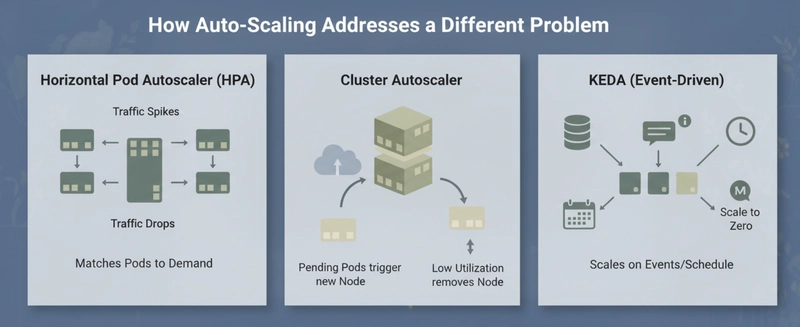
Horizontal Pod Autoscaler (HPA) adds or removes pod replicas based on CPU utilization or custom metrics. When traffic spikes, more pods appear. When traffic drops, excess pods terminate. This prevents the cluster from being statically sized for peak load when average load is much lower.
Cluster Autoscaler works at the node level. When pending pods cannot be scheduled because no node has enough capacity, it provisions a new node. When a node’s actual utilization drops below a threshold for 10 consecutive minutes, it removes it. The trigger is pod requests, not actual CPU or memory usage.
KEDA extends HPA with event-driven scaling. Instead of scaling on CPU, you can scale on queue depth, Prometheus metrics, scheduled time windows, or external signals. A batch processor that runs overnight can scale to zero during business hours and scale back up at midnight.
Auto-scaling is most valuable when the load is genuinely variable. A service that gets 5x more traffic at noon than at midnight should not run peak-capacity nodes all day. Auto-scaling handles that. A service that runs at steady load 24 hours a day gets nothing from HPA, but gets real savings from right-sizing.
The critical failure mode: if you enable HPA on overprovisioned pods, every new replica inherits the bloated requests. Scaling from 5 pods to 15 pods triples the cluster cost, but the actual work is the same per replica, just distributed across more instances.
Right-sizing delivers immediate, permanent reduction. It works regardless of traffic shape because it corrects the structural waste in how pods claim resources. Auto-scaling delivers proportional reduction on variable workloads. It works because it removes capacity that is genuinely not needed at a given moment.
Neither approach alone is complete. Right-sizing a statically-sized cluster still leaves it over-provisioned for off-peak hours. Auto-scaling an unright-sized cluster scales up and down efficiently.
The one situation where auto-scaling wins outright: EKS Fargate. Fargate charges per vCPU-second and GB-second of actual pod requests, not for idle node capacity. Right-sizing requests directly reduces the bill with no node management. But Cluster Autoscaler is irrelevant on Fargate since there are no nodes to manage. KEDA and HPA still apply.
Applying both approaches in the correct sequence is where the real savings appear. The sequence we use in production:
Step 1: Measure with VPA Recommendation. Deploy VPA in Recommendation mode and let it observe your workloads for at least 7 days. Include a representative sample of traffic, including any weekly peaks. VPA will output a suggested CPU and memory request based on observed percentiles.
Step 2: Apply right-sized requests. Take the VPA recommendation, add 15-20% headroom for burst, and apply it to your pod specs. Roll this out service by service, not all at once. Watch for OOMKilled events in the first 24 hours. An OOMKill means the memory request was set below the actual peak usage. Adjust and re-roll.
Step 3: Tune HPA thresholds. HPA uses CPU target as a percentage of the pod’s CPU request. If a pod requests 1000m CPU and you set HPA to target 70%, it scales at 700m actual CPU. After right-sizing to 250m CPU, that same 70% target triggers at 175m actual CPU. If your workload doesn’t spike that low, HPA will never scale. Recalibrate the target percentage after right-sizing.
Step 4: Validate Cluster Autoscaler behavior. After right-sizing, nodes should consolidate. Cluster Autoscaler should remove nodes that are now underutilized because pods pack more efficiently. If it does not, check the –scale-down-utilization-threshold setting. The default is 50% of requests. With right-sized requests, actual usage should be closer to requests, so utilization will read higher and nodes may survive scale-down review. You may need to lower the threshold slightly or enable bin-packing with the –balance-similar-node-groups flag.
On a 3-node m5.2xlarge cluster running 15 services, this sequence typically consolidates to 1-2 nodes and reduces the hourly EC2 cost from $1.15 to $0.38-0.57. That is a 50-67% reduction. Auto-scaling on its own, without the right-sizing step, would have reduced cost only during off-peak windows, yielding a smaller net monthly reduction.
Right-sizing wins on immediate, permanent impact. Auto-scaling wins on dynamic efficiency. Run both. Run right-sizing first.
If you only auto-scale, you are efficiently managing a wasteful architecture. If you only right-size, you are running a lean architecture that can’t breathe with your traffic.
The most significant EKS savings don’t come from a single “silver bullet” setting; they come from the Right-Size → Bin-Pack → Auto-Scale pipeline. By correcting your pod requests first, you provide the Cluster Autoscaler with the accurate data it needs to actually trigger a scale-down.Start with VPA in recommendation mode today and let your monthly AWS bill reflect the difference.
Are you sure you want to hide this comment? It will become hidden in your post, but will still be visible via the comment’s permalink.
For further actions, you may consider blocking this person and/or reporting abuse
DEV Community — A space to discuss and keep up software development and manage your software career
Built on Forem — the open source software that powers DEV and other inclusive communities.
Why it matters
News like this often changes audience expectations and competitors’ plans.
When one player makes a move, others usually react — it is worth reading the event in context.
What to look out for next
The full picture will become clear in time, but the headline already shows the dynamics of the industry.
Further statements and user reactions will add to the story.